
Customer · C001
Alex Example
Phone: 07700 900123
Email: alex@example.com
Free customer-record spreadsheet · No signup
Keep the customer once. Link each property and enquiry to that record, then give the next action an owner. This free workbook gives a small trade business a practical starting point before moving to a CRM.
Excel workbook · Four sheets · No macros
Three blank working sheets plus a separate fictional example. Nothing you enter is uploaded to MMD by this workbook.
Download the Excel template (.xlsx)Prefer CSV? Get the three blank CSV sheets.
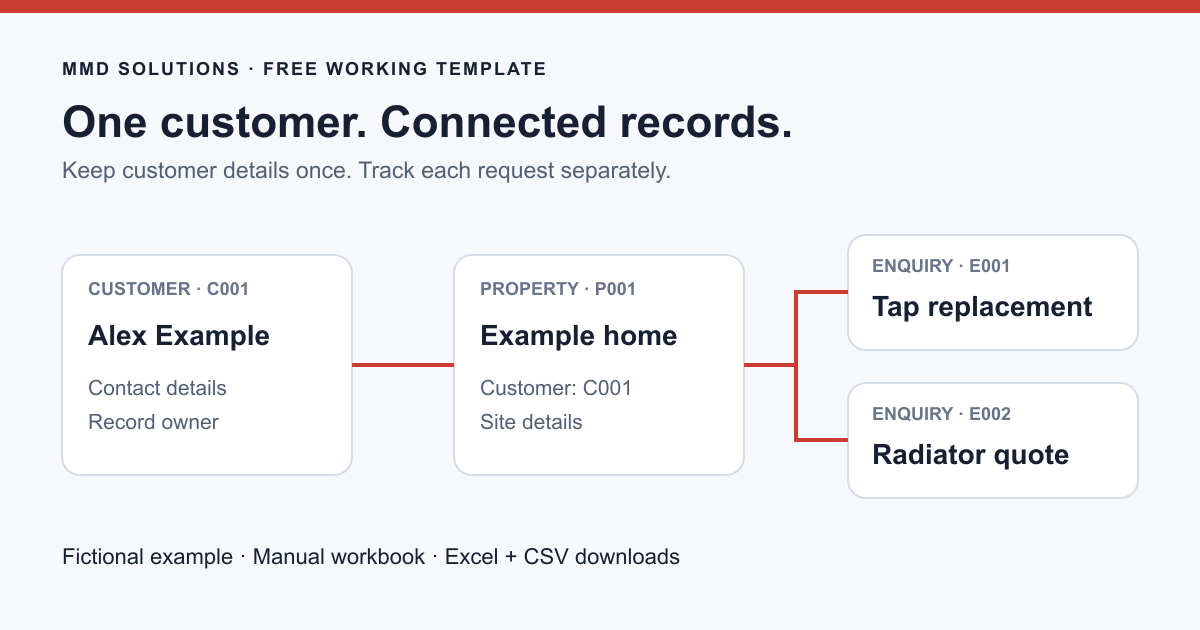
A customer, a property and an enquiry describe different things. Keeping them separate lets you retain one customer’s contact details while recording several sites or requests.
IDs such as C001, P001 and E001 are references you assign, not row numbers. Keep them unchanged when sorting. The workbook does not automatically join sheets, check references, merge duplicates or send reminders; review those links yourself.
For the wider approach, read what a single customer record should contain. For a simple queue of return calls, the smaller callback tracker may be enough.
Alex Example calls about a replacement tap. Later, the same person asks for a radiator quote at the same property. Create two enquiries without entering Alex as a new customer twice.
Customer · C001
Phone: 07700 900123
Email: alex@example.com
Property · P001
Customer: C001
Address: not provided
Enquiry · E001
Customer: C001 · Property: P001
Next: arrange survey · Owner: office
Enquiry · E002
Customer: C001 · Property: P001
Next: confirm details · Owner: office
These details are fictional. The example sheet is separate from the blank working sheets. A site address is intentionally absent: confirm it with the customer before planning a visit. If the second request concerns another property, create a new property ID instead of overwriting the old address.
A quote reference links to your quoting system; it is not the quote itself. Likewise, “Quote sent” does not mean the customer has accepted, and an enquiry is not a confirmed booking.
In the XLSX template, phone and ID cells are formatted as text, and date columns have a date format. Enter real dates so you can sort them. The Enquiries sheet includes a status list; it does not enforce a business process or check whether a job is ready to proceed.
When importing the CSV alternatives, set phone and reference columns to Text in Excel’s import controls. In Google Sheets, prevent automatic number conversion for those fields and check the result. CSV files do not preserve workbook formatting, dropdowns or separate tabs. Microsoft explains CSV import and number conversion.
Start a daily review with enquiries that have an action due. After a conversation, update the outcome and set the next action while the details are fresh. An unanswered call stays open unless you deliberately decide to close it.
Confirm changed contact details in Customers, and check which property a new request concerns. A customer moving home does not make the address on an old completed job wrong. Keep historical job evidence in its proper job record rather than rewriting it in a general contact sheet.
Use the enquiry information checklist when a message is incomplete, the job sheet once work is arranged, and the quote follow-up templates when waiting for a decision.
Keep notes factual and relevant to arranging the work. Do not put payment-card details, passwords, key-safe codes or alarm codes in a general customer workbook. Restrict access, check accuracy and decide when records no longer need to be kept. A template cannot set the right retention period for every business.
The ICO’s data-minimisation guidance explains why personal data should be adequate, relevant and limited to the purpose. Using this file does not, by itself, establish data-protection compliance.
The workbook is the easiest starting point. These optional CSV files contain headings only. Import each into its own sheet:
If multiple people need reminders, change history, reliable matching or permissions for different roles, compare a CRM with this manual approach. Keep the same questions: which customer, which site, who owns this and what happens next?
Read CRM options for tradespeople and how enquiry capture can connect to a CRM. MMD can discuss a scoped connection to your existing tools; this download is a manual resource, not a preconfigured integration.
Published and reviewed 22 October 2026. Original MMD workbook, structure and fictional example. Microsoft import guidance and ICO data-minimisation guidance are linked above. No measured time saving, customer result or search-volume claim is made.