
Templates & tools
Sole Trader Invoice Template UK: A Trade-Business Example
A sole trader invoice template should make three things clear: who did the work, what is being charged for and how the customer can pay. For tradespeople, it also helps to link the charge to the right visit, property and approved scope.
Download the editable non-VAT invoice (HTML)
Open the downloaded file in a browser, click the placeholder text to edit it, check the figures manually and use your browser’s Print option to print or save a PDF. It does not calculate totals or submit information anywhere. Save your own issued copy in your normal record system; editing the page alone does not save a file.
Scope: this blank template is for a straightforward invoice from a sole trader who is not VAT registered. It is not a VAT, construction reverse-charge, CIS or credit-note template. Ask your accountant or use an appropriate accounting-system template where those issues apply.
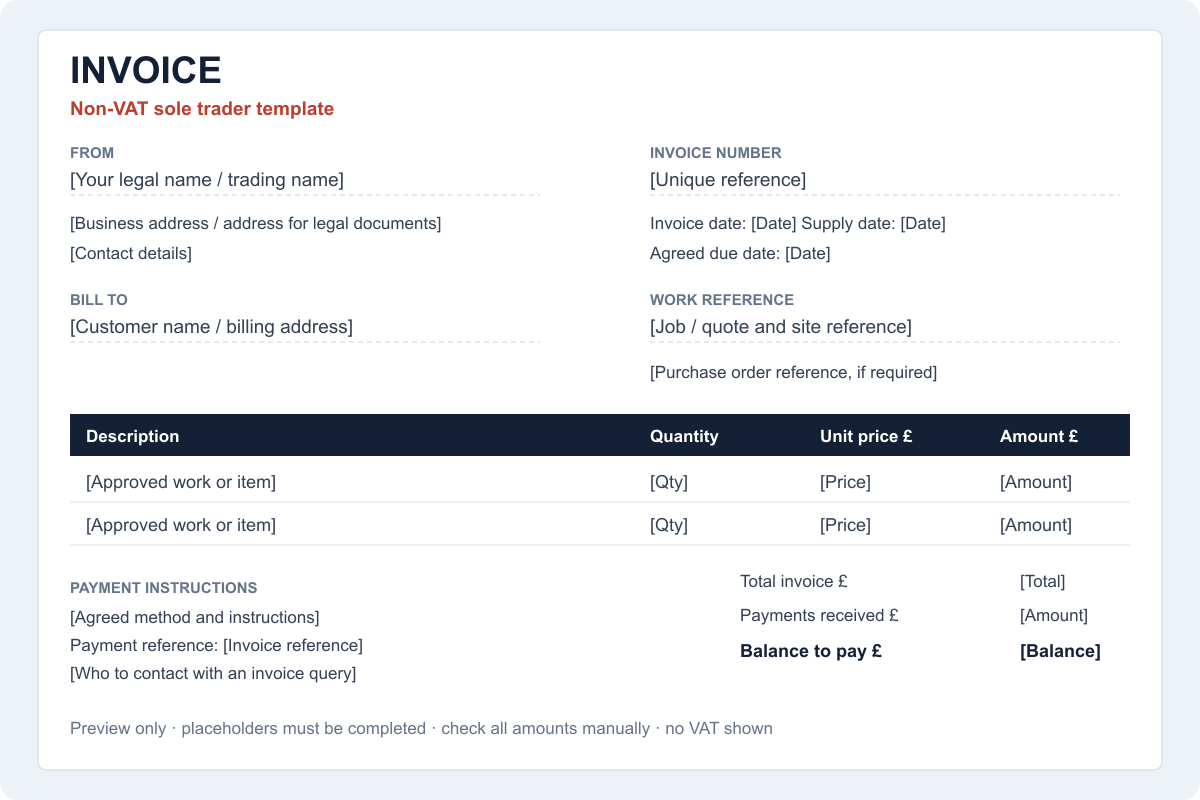
What details belong on a UK invoice?
GOV.UK lists the core requirements, including a unique number, supplier and customer information, a description, supply and invoice dates, amounts and any applicable VAT. Sole traders also need their own name and any trading name, with an address for legal documents where applicable. Read the official invoice requirements.
The download includes those core fields for its stated non-VAT scope, plus practical spaces for a job reference, agreed payment date and payment instructions. Do not copy a VAT line into a non-VAT business’s invoice to make it look more official.
A simple trade invoice example
Consider this invented example for an ordinary repair by a non-VAT-registered sole trader:
| Description | Quantity | Unit price | Amount |
|---|---|---|---|
| Approved repair labour | 2 hours | £45.00 | £90.00 |
| Agreed replacement materials | 1 | £18.00 | £18.00 |
| Total to pay | £108.00 | ||
The customer should be able to connect that description to the work they approved. “Labour and bits” may mean something to you but leave a landlord or accounts team looking for an explanation. Use an appropriate level of detail without including private site notes that do not belong on the invoice.
Check the billing recipient before sending. The person who let you into a property may not be the person paying. Keep the work-site address as a separate reference where it helps the customer identify the job.
Agree payment details before the work becomes an invoice
An invoice should record the agreed position, not introduce surprise terms after the event. Confirm the customer’s invoice contact, any purchase-order reference and when payment is expected while the job is being arranged.
The Small Business Commissioner specifically highlights recipient details, the expected payment date and obtaining a required purchase order early. Its invoicing checklist is a useful reference.
Use a clear payment reference so you can match incoming funds to the correct invoice. If bank details change, follow a verification process with the customer; do not rely on a last-minute email alone. Keep the issued invoice and payment record connected rather than marking a job paid from memory.
What if you are VAT registered or work under CIS?
Use the appropriate invoice format and confirmed treatment. VAT invoicing has additional requirements, and some construction supplies may fall under the domestic reverse charge. CIS introduces separate considerations. A general template cannot decide those questions from a customer’s trade name.
Consult HMRC’s VAT guide and, where relevant, its construction reverse-charge guidance. Have your accountant or accounting provider confirm the setup. The non-VAT download intentionally does not try to calculate those treatments.
Avoid rebuilding the invoice from message threads
Keep a usable record before you start the invoice: the approved quote version, completion status, materials and agreed changes. Carry the job reference through the process. A missing approval is a question to resolve, not a gap for automation to guess at.
If you repeatedly type the same customer address into several systems, consider a shared customer record. If invoice preparation is already quick and accurate, focus on the next bottleneck rather than replacing the system for its own sake.
For an invoice that remains unpaid after the agreed date, use our payment reminder templates and pre-send checks. Check the balance and any dispute before sending a reminder.
Common questions
Can a plumber or electrician use this template?
Yes, within its stated non-VAT sole-trader scope and after adapting the details. It is not a trade compliance certificate or a substitute for any specialist invoice treatment you need.
Does a PDF invoice prove the money was received?
No. An invoice and a payment record serve different purposes. Check the incoming payment and record the result.
What should I do if the invoice is not paid?
Check the record, recipient and agreed due date first. Keep any dispute separate from routine reminders. Our quote follow-up templates address the earlier sales stage; payment chasing needs a separate process.