
One clear goal
Turn warm-lead tracking into a reviewable next-step queue. This package contains five three-touch sequences, a CSV tracker, a local browser planner and an optional command-line script. It does not send email.
Start with the fictional example
- Extract the ZIP and open
index.htmlin a current Chrome, Edge, Firefox or Safari. - Choose Load fictional example. It sets the planning date to 10 October 2026 so the worked example stays repeatable.
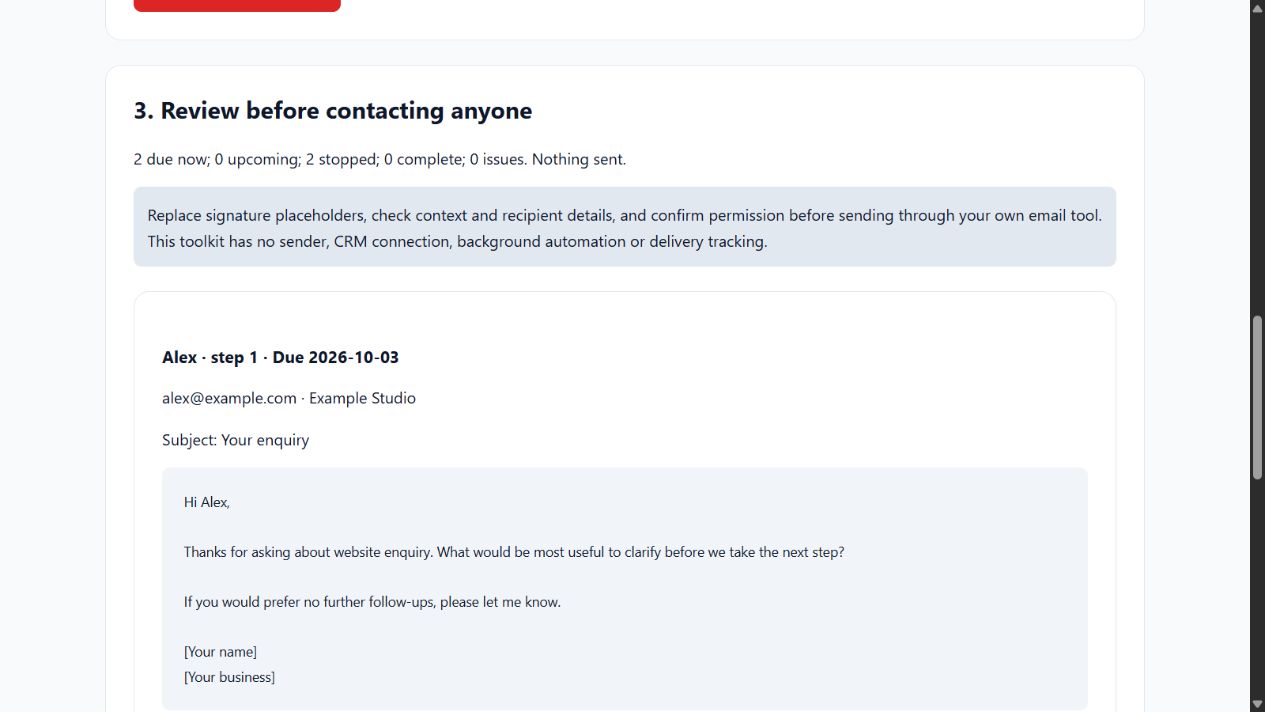
- Choose Build follow-up queue. Two active permitted leads have due drafts; one replied lead and one opted-out lead are stopped.
- Review each subject, body and due date. Replace
[Your name]and[Your business]before any real use. - Download draft Markdown, the full audit JSON or the validated tracker. Nothing is sent and no sent/status fields are automatically advanced.
Tracker contract
Use comma-separated UTF-8 CSV in this exact header order:
lead_id,name,email,company,context,sequence,start_date,last_sent_step,last_sent_date,status,permission
Keep a unique lead ID, name, email and short context for each active lead. Company can be blank. Permission must be yes or no; only mark yes when you have an appropriate relationship and permission to make that contact. The tool does not determine consent or verify that an address exists.
Status values: active, replied, opted_out, won, lost, paused. Only active leads with permission yes produce drafts. Stop status and permission take precedence, so opted-out records do not accidentally re-enter the queue because of other incomplete fields.
start_date is the sequence anchor. last_sent_step is 0, 1, 2 or 3. Use 0 and a blank last-sent date before any follow-up; after a real send, enter its step and actual date. Dates use YYYY-MM-DD. A last-sent date must be between the start and planning dates. Three completed steps end the sequence.
Five sequences
| Sequence key | Purpose | Days after start |
|---|---|---|
| enquiry | Warm inbound enquiry | 2, 5, 10 |
| quote | Quote already sent | 3, 7, 14 |
| meeting | Following a meeting | 1, 4, 9 |
| proposal | Proposal review | 3, 8, 15 |
| requested_checkin | A check-in the lead requested | 0, 5, 12 |
For requested_checkin, set start_date to the requested check-in date. All offsets are calendar days, without weekends, holidays, send times or timezone automation. Templates are in SEQUENCES.md; edit core.js to change planner text or timing and rerun the tests.
Late sends and stop rules
Only one next step is generated per lead. If a send is late, the next due date is the later of the original scheduled date and the actual send date plus the gap between those steps. This avoids a burst of catch-up messages. Before every run, record actual replies, opt-outs, paused or closed opportunities. The toolkit does not connect to your inbox, so it cannot discover these events.
Drafts include an invitation to stop further follow-ups. Review the message and recipient before manually contacting anyone through your own tools. No cold-list sourcing, bulk sending, SMTP credentials, tracking pixels or automatic campaigns are included.
Limits, exports and privacy
Full download: 2 MB and 10,000 nonblank data rows. Hosted demo: 20 rows. The page previews the first 100 queue entries and first 100 items per audit category; exports contain all. Invalid active records are excluded with issues; duplicate IDs exclude every occurrence. Keep the original input and resolve issues. The validated tracker omits invalid records and retains existing send/status fields.
The browser stores no data between visits and makes no network requests. Exported drafts and audit reports contain contact details, so save them privately. CSV exports prefix formula-like cells (=, +, -, @) with an apostrophe. If you reimport such an export, that prefix remains part of the value; use plain IDs/names for clean round trips. Email validation checks structure only.
Optional local automation
With Node.js 18 or later, run:
node --test core.test.cjs
node plan.cjs --input sample-leads.csv --as-of 2026-10-10 --output queue.json
The script creates a new local report and refuses to overwrite input or existing output. Exit 0 = no validation issues; 2 = issues to resolve; 1 = failure. You can schedule report generation yourself, but no message is sent. Keep reports private and refresh the tracker first.
Purchase and support
£19 once includes version 1.0.0, planner/source, five sequences, blank and example trackers, tests, optional script, this guide, internal-business-use licence and 90 days of installation support. Future versions, bespoke sequences and delivery services are not promised. Support: support@mmd-solutions.co.uk.
Source and current version
This documentation is generated from the tool’s own versioned guide. See the current Hub guide and tool page for availability and release details.